Software Requirements Specification
Version: 2.0
Date: January 2025
Document Status: Current
Table of Contents
- Introduction
- Overall Description
- System Architecture
- User Roles and Permissions
- Backend API Documentation
- Frontend Features and Components
- Functional Requirements
- Non-Functional Requirements
- Data Models and Schemas
- Security Features
- Helper Functions and Utilities
1. Introduction
1.1 Purpose
This Software Requirements Specification (SRS) document provides a comprehensive description of the RivCoDelivery application, a full-stack food delivery platform. The document specifies functional and non-functional requirements, system architecture, API endpoints, user interfaces, and security features for both the frontend (Astro/React) and backend (Node.js/Express) components.
1.2 Scope
The RivCoDelivery application enables:
- Users to discover restaurants, browse menus, customize menu items, place orders, and track order history
- Restaurant owners to manage their restaurant profiles, menu items, and ingredients
- Drivers to view and manage delivery orders
- Administrators to manage users, restaurants, and system-wide operations
The system includes role-based access control (RBAC), Google OAuth authentication, session management, shopping cart functionality, order processing, and delivery fee calculation based on distance.
1.3 Definitions and Acronyms
- API: Application Programming Interface
- RBAC: Role-Based Access Control
- OAuth: Open Authorization protocol
- CSRF: Cross-Site Request Forgery
- SQL: Structured Query Language
- JSON: JavaScript Object Notation
- REST: Representational State Transfer
- HTTPS: Hypertext Transfer Protocol Secure
- CORS: Cross-Origin Resource Sharing
1.4 References
- Node.js Documentation: https://nodejs.org/
- Express.js Documentation: https://expressjs.com/
- React Documentation: https://react.dev/
- Astro Documentation: https://astro.build/
- MySQL Documentation: https://dev.mysql.com/doc/
- Google OAuth 2.0: https://developers.google.com/identity/protocols/oauth2
- Zod Validation: https://zod.dev/
2. Overall Description
2.1 Product Perspective
RivCoDelivery is a web-based food delivery platform consisting of:
Frontend:
- Astro framework with React components
- React Router for client-side routing
- Bootstrap and Tailwind CSS for styling
- Google Maps API integration for location services
- Axios for HTTP requests
Backend:
- Node.js runtime with Express.js framework
- MySQL database for data persistence
- Passport.js for Google OAuth authentication
- Express-session for session management
- Zod for input validation
- Helmet for security headers
Infrastructure:
- MySQL database with connection pooling
- Session storage in MySQL
- HTTPS in production
- Rate limiting for API protection
2.2 Product Functions
Core Functions:
- User authentication via Google OAuth
- Restaurant discovery based on user location
- Menu browsing and item customization
- Shopping cart management
- Order placement and processing
- Order tracking and management
- User profile and address management
- Restaurant administration
- Menu and ingredient management
- Driver order management
2.3 User Classes and Characteristics
Role 0 - Basic User:
- Browse restaurants and menus
- Customize menu items with ingredients
- Add items to cart
- Place orders
- View order history
- Manage profile and delivery address
Role 1 - Driver:
- All Basic User capabilities
- View open orders
- Mark orders as closed/completed
- View order details and delivery information
Role 2 - Restaurant Owner/Admin:
- All Driver capabilities
- Manage restaurant profile
- Create, update, and delete menu items
- Manage menu item ingredients
- Link ingredients to menu items
- View and manage users (admin only)
- Assign user roles and restaurant associations
2.4 Operating Environment
Frontend:
- Modern web browsers (Chrome, Firefox, Safari, Edge)
- JavaScript enabled
- Internet connection
- Google Maps API access
Backend:
- Node.js 14+ runtime
- MySQL 5.7+ database
- HTTPS/SSL certificate (production)
- Environment variables for configuration
2.5 Design Constraints
- All API endpoints require authentication (except
/api/health) - Role-based access control enforced on all protected routes
- Input validation using Zod schemas
- CSRF protection on state-changing operations
- Rate limiting on authentication and order placement
- Session-based authentication with 2-hour expiration
- CORS restricted to production domains
2.6 Assumptions and Dependencies
Assumptions:
- Users have Google accounts for authentication
- Users have valid delivery addresses
- Restaurants have valid addresses with latitude/longitude
- Database schema matches application expectations
- HTTPS is enabled in production
Dependencies:
- Google OAuth 2.0 credentials
- Google Maps API key
- MySQL database server
- Environment variables properly configured
- Node.js and npm package manager
3. System Architecture
3.1 Frontend Architecture
Technology Stack:
- Framework: Astro 5.4.0 (SSR with hybrid SPA)
- UI Library: React 19.0.0
- Routing: React Router DOM 7.2.0 (SPA) + Astro file-based routing (SSR)
- HTTP Client: Axios 1.8.1
- Styling: Tailwind CSS 4.1.3, Bootstrap Icons 1.11.3
- Currency: currency.js 2.0.4
Hybrid SSR/SPA Architecture: The application uses a hybrid architecture that combines Server-Side Rendering (SSR) for SEO and initial page loads with a Single Page Application (SPA) for authenticated users:
-
SSR Pages (Astro): All public-facing pages are rendered server-side for optimal SEO:
- Home page (
/) - City pages (
/restaurants/[city]) - Restaurant pages (
/restaurants/[city]/[restaurant]) - Menu item pages (
/restaurants/[city]/[restaurant]/menu/[item]) - Category pages (
/restaurants/[city]/categories/[category]) - Ingredient pages (
/ingredients/[ingredient]and/restaurants/[city]/[restaurant]/ingredients/[ingredient]) - Blog pages (
/blog/*)
- Home page (
-
SPA Routes (React Router): Authenticated users see a client-side React application:
- User management (
/users) - Order history (
/user-orders,/orders) - Cart and checkout (nested under restaurant routes)
- Admin features
- User management (
-
Authentication-Based Rendering:
- Unauthenticated users: See SSR content with full HTML, meta tags, and structured data
- Authenticated users: SSR content hidden, SPA mounted via
SSRAppWrapper - Client-side script checks authentication and toggles visibility
Component Structure:
src/
├── components/
│   ├── App.jsx (Main SPA router)
│   ├── SSRAppWrapper.jsx (SSR-to-SPA bridge)
│   ├── RedirectToNewUrl.jsx (Backward compatibility)
│   ├── common/
│   │   ├── Button.jsx (Reusable button component)
│   │   ├── Pagination.jsx (Reusable pagination component)
│   │   ├── BreadcrumbWrapper.jsx (SPA breadcrumb generator)
│   │   ├── Link.astro (Reusable link component with variants)
│   │   └── ResponsiveFlexRow.jsx (Responsive layout component)
│   ├── restaurants/ (Restaurant management & browsing)
│   │   ├── RestaurantsList.jsx
│   │   ├── CategoryPage.jsx
│   │   ├── menu/ (Menu components)
│   │   └── Admin.jsx, ManageRestaurant.jsx, etc.
│   ├── users/ (User-facing features)
│   │   ├── nav/ (Navigation components)
│   │   ├── cart/ (Cart components)
│   │   ├── checkout/ (Checkout components)
│   │   ├── orders/ (Order history)
│   │   └── address/ (Address management)
│   ├── drivers/ (Driver features)
│   │   └── orders/DriverOrders.jsx
│   └── webmaster/ (Admin features)
│       ├── Users.jsx
│       └── Resume.jsx
├── pages/ (Astro SSR pages)
│   ├── index.astro (Home)
│   ├── restaurants/[city].astro
│   ├── restaurants/[city]/[restaurant].astro
│   ├── restaurants/[city]/[restaurant]/menu/[item].astro
│   ├── restaurants/[city]/categories/[category].astro
│   ├── restaurants/[city]/[restaurant]/ingredients/[ingredient].astro
│   ├── ingredients/[ingredient].astro
│   ├── users.astro (SPA wrapper)
│   ├── user-orders.astro (SPA wrapper)
│   ├── orders.astro (SPA wrapper)
│   └── blog/ (Blog pages)
├── layouts/
│   └── BlogPost.astro (Blog layout)
└── styles/ (Global styles)
State Management:
- React useState and useEffect hooks
- LocalStorage for profile persistence
- Session-based authentication state
- Component-level state for UI interactions
- Server-side state for SSR pages (fetched at build/render time)
3.2 Backend Architecture
Technology Stack:
- Runtime: Node.js
- Framework: Express.js 4.21.2
- Database: MySQL 3.11.5 (mysql2)
- Authentication: Passport.js 0.7.0, Google OAuth 2.0
- Session: express-session 1.18.1, express-mysql-session 3.0.3
- Validation: Zod 3.24.1
- Security: Helmet 8.1.0, csurf 1.11.0, express-rate-limit 7.4.1
Route Structure:
routes/
├── index.js (Route registration)
├── auth.js (Authentication)
├── users.js (User management)
├── userAddress.js (Address management)
├── restaurants.js (Restaurant operations)
├── menuItems.js (Menu item operations)
├── menuIngredients.js (Ingredient operations)
├── cart.js (Shopping cart)
├── checkout.js (Order placement)
├── orders.js (Order management)
└── public.js (Public endpoints)
Middleware:
- Authentication middleware (
checkRole) - CSRF protection
- Rate limiting
- CORS configuration
- Security headers (Helmet)
- Session management
3.3 Database Architecture
Core Tables:
users- User accounts and profilesrestaurants- Restaurant informationmenu_items- Menu item definitionsmenu_item_ingredients- Ingredient definitionsmenu_item_ingredients_map- Menu item to ingredient relationshipscart- Shopping cart itemsorders- Order recordsorder_items- Individual order line itemssessions- Express session storage
Relationships:
- Users have one restaurant (restaurant owners)
- Restaurants have many menu items
- Menu items have many ingredients (many-to-many via map table)
- Users have many cart items
- Users have many orders
- Orders have many order items
3.4 Authentication & Authorization
Authentication Flow:
- User initiates Google OAuth login
- Frontend redirects to
/api/auth/google - Google OAuth callback at
/api/auth/google/callback - Session created with user information
- Session stored in MySQL sessions table
Authorization:
- Role-based access control (RBAC)
- Three roles: 0 (User), 1 (Driver), 2 (Restaurant/Admin)
- Middleware
checkRole(requiredRole)enforces access - Users can only access/modify their own data
- Restaurant owners can only manage their own restaurant
- Admins can manage all resources
4. User Roles and Permissions
4.1 Role 0: Basic User
Permissions
| Permission | Allowed |
|---|---|
| View restaurants list | ✅ |
| View restaurant menus | ✅ |
| View menu items and ingredients | ✅ |
| Add items to cart | ✅ |
| View own cart | ✅ |
| Place orders | ✅ |
| View own order history | ✅ |
| Manage own profile | ✅ |
| Manage own delivery address | ✅ |
| Search menu items | ✅ |
| Manage restaurants | ❌ |
| Manage menu items | ❌ |
| View other users’ orders | ❌ |
| Change user roles | ❌ |
API Access
| Endpoint | Method | Description |
|---|---|---|
/api/restaurants/:restaurant | GET | Get restaurant details by ID |
/api/restaurants/:latitude/:longitude | GET | Get restaurants sorted by distance from coordinates |
/api/restaurants2/:restaurantId/menu | GET | Get menu items for a restaurant (public endpoint) |
/api/restaurant-cities | GET | Get list of all cities with restaurants (public) |
/api/restaurants-by-city | GET | Get restaurants filtered by city slug (public) |
/api/public/restaurants/:id | GET | Get restaurant by ID (public, for SSR) |
/api/public/restaurants/:restaurantId/ingredients/:slug | GET | Get menu items by ingredient at specific restaurant (public) |
/api/public/restaurants-by-city-and-category | GET | Get restaurants by city and category (public) |
/api/public/categories | GET | Get all unique restaurant categories (public) |
/api/public/cities/:city_slug/categories | GET | Get categories available in a specific city (public) |
/api/public/ingredients/:slug | GET | Get menu items using an ingredient globally (public) |
/api/public/menu-items/:id | GET | Get menu item by ID with restaurant context (public) |
/api/public/menu-items-by-slug | GET | Get menu item by slug and restaurant ID (public) |
/api/public/menu-items/:id/ingredients | GET | Get ingredients for a menu item (public) |
/api/menu/item | GET | Get menu item by ID (query param: menuItem) |
/api/menu/item/search | GET | Search menu items by name (query param: menuItemName) |
/api/menu/item/ingredients | GET | Get ingredients for a menu item (query param: menuItem) |
/api/cart | GET, POST, DELETE | Get, save, or clear shopping cart |
/api/checkout-data/:selected_restaurant? | GET | Get checkout data (cart, address, restaurant) - optional restaurant param |
/api/co | POST | Place order (checkout) - rate limited |
/api/user/orders | GET | Get authenticated user’s order history (paginated) |
/api/user/address | GET, POST, PUT | Get, update, or clear delivery address |
/api/user/details | GET | Get authenticated user details |
/api/users/:id/selected_restaurant | GET, PUT | Get or update user’s selected restaurant preference (own ID only) |
4.2 Role 1: Driver
Permissions
| Permission | Allowed |
|---|---|
| All Basic User permissions | ✅ |
| View all open orders | ✅ |
| View order details | ✅ |
| Mark orders as closed | ✅ |
| Manage restaurants | ❌ |
| Manage menu items | ❌ |
| Manage users | ❌ |
API Access
| Endpoint | Method | Description |
|---|---|---|
| All Role 0 endpoints | - | Inherits all Basic User API access |
/api/orders | GET | Get all open orders (paginated, driver view) |
/api/order_items | GET | Get order items for a specific order |
/api/changeOrderOpen | POST | Mark order as closed/completed |
4.3 Role 2: Restaurant Owner/Admin
Permissions
| Permission | Allowed |
|---|---|
| All Driver permissions | ✅ |
| Manage own restaurant profile | ✅ |
| Create, update, delete menu items (own restaurant) | ✅ |
| Manage ingredients (own restaurant) | ✅ |
| Link ingredients to menu items (own restaurant) | ✅ |
| View own restaurant menu items | ✅ |
| Manage users (admin only) | ✅ |
| Assign user roles (admin only) | ✅ |
| Assign restaurant associations (admin only) | ✅ |
| Manage other restaurants’ menus (unless admin) | ❌ |
API Access
| Endpoint | Method | Description |
|---|---|---|
| All Role 1 endpoints | - | Inherits all Driver API access |
/api/addRestaurant | POST | Create new restaurant |
/api/manageRestaurant | POST | Create or update restaurant (for restaurant owners) |
/api/getUserRestaurant | GET | Get restaurant associated with current user |
/api/add-menu-item | POST | Create new menu item (own restaurant only) |
/api/update-menu-item/:id | POST | Update existing menu item (own restaurant only) |
/api/menu-items/:id | DELETE | Delete menu item (own restaurant only) |
/api/menu-items | POST | Link ingredient to menu item (own restaurant only) |
/api/menu-items-list | GET | Get all menu items for user’s restaurant |
/api/menu-item-ingredients | POST | Create new ingredient (own restaurant only) |
/api/menu-item-ingredients/:ingredient_id | DELETE | Delete ingredient (own restaurant only) |
/api/menu-ingredients/:id | PUT | Update ingredient (own restaurant only) |
/api/users | GET | Get paginated list of users (admin only) |
/api/users/:id/role | PUT | Update user role (admin only) |
/api/users/:id/restaurant | PUT | Assign restaurant to user (admin only) |
/api/users/:id/cart | DELETE | Clear a specific user’s cart (admin only) |
5. Backend API Documentation
5.1 Authentication Routes
POST /api/google-login
Description: Authenticate user with Google ID token
Authentication: None (rate limited)
Request Body:
{
  "token": "string (Google ID token)"
}
Response: 200 OK
{
  "sub": "string (Google user ID)",
  "email": "string",
  "name": "string",
  "picture": "string (URL)"
}
Error Responses:
401- Invalid token429- Too many login attempts
GET /api/session
Description: Get current user session
Authentication: Session cookie
Response: 200 OK
{
  "sub": "string",
  "email": "string",
  "name": "string",
  "picture": "string"
}
Error Responses:
401- Not authenticated
GET /api/logout
Description: Logout current user
Authentication: Session cookie
Response: 200 OK
{
  "message": "Logged out successfully"
}
GET /api/auth/google
Description: Initiate Google OAuth flow
Authentication: None
Response: Redirect to Google OAuth
GET /api/auth/google/callback
Description: Google OAuth callback
Authentication: None
Response: Redirect to /api/profile
GET /api/profile
Description: Get authenticated user profile
Authentication: Passport session
Response: 200 OK or redirect to /
5.2 User Management Routes
GET /api/users
Description: Get paginated list of users
Authentication: Role 2 (Admin)
Query Parameters:
page(number, default: 1, max: 1000)limit(number, default: 10, max: 100)query(string, optional, max: 100 chars) - Search by name or email
Response: 200 OK
{
  "users": [
    {
      "id": "string",
      "name": "string",
      "email": "string",
      "role": 0,
      "restaurant_id": 1,
      "address": "string"
    }
  ],
  "pagination": {
    "page": 1,
    "limit": 10,
    "total": 50,
    "totalPages": 5
  }
}
PUT /api/users/:id/role
Description: Update user role
Authentication: Role 2 (Admin)
Path Parameters:
id(string) - User ID
Request Body:
{
  "role": 0 | 1 | 2
}
Response: 200 OK
{
  "message": "Role updated successfully",
  "role": 1
}
Error Responses:
400- Validation failed403- Cannot change own role / Cannot lower admin role404- User not found
PUT /api/users/:id/restaurant
Description: Assign restaurant to user
Authentication: Role 2 (Admin)
Path Parameters:
id(string) - User ID
Request Body:
{
  "restaurant_id": 1
}
Response: 200 OK
{
  "message": "Restaurant ID updated successfully"
}
PUT /api/users/:id/selected_restaurant
Description: Update user’s selected restaurant preference
Authentication: Role 0+ (own ID only)
Path Parameters:
id(string) - User ID (must match session user)
Request Body:
{
  "restaurant_id": 1
}
Response: 200 OK
{
  "message": "Restaurant ID updated successfully"
}
GET /api/users/:id/selected_restaurant
Description: Get user’s selected restaurant
Authentication: Role 0+ (own ID only)
Path Parameters:
id(string) - User ID
Response: 200 OK
{
  "selected_restaurant": 1
}
GET /api/user/details
Description: Get authenticated user details
Authentication: Role 0+
Response: 200 OK
{
  "id": "string",
  "name": "string",
  "email": "string",
  "address": "string"
}
DELETE /api/users/:id/cart
Description: Clear a specific user’s cart (admin only)
Authentication: Role 2 (Admin)
Path Parameters:
id(string) - User ID whose cart should be cleared
Response: 200 OK
{
  "message": "Cart cleared successfully",
  "removed": 3
}
Response: 404 Not Found - User not found
{
  "error": "User not found"
}
5.3 User Address Routes
GET /api/user/address
Description: Get user’s delivery address
Authentication: Role 0+
Response: 200 OK
{
  "address": {
    "streetNumber": "string",
    "street": "string",
    "city": "string",
    "state": "string",
    "zip": "string"
  },
  "latitude": 33.9519,
  "longitude": -117.3962
}
POST /api/user/address
Description: Update user’s delivery address
Authentication: Role 0+
Request Body:
{
  "address": {
    "streetNumber": "string (max 50)",
    "street": "string (max 200)",
    "city": "string (max 100)",
    "state": "string (max 50)",
    "zip": "string (max 20)"
  },
  "latitude": -90 to 90,
  "longitude": -180 to 180
}
Response: 200 OK
{
  "success": true
}
PUT /api/user/address
Description: Clear user’s delivery address
Authentication: Role 0+
Response: 200 OK
{
  "success": true
}
GET /api/user/full-address
Description: Get formatted full address string
Authentication: Role 0+
Response: 200 OK
{
  "address": {
    "streetNumber": "string",
    "street": "string",
    "city": "string",
    "state": "string",
    "zip": "string"
  }
}
5.4 Restaurant Routes
GET /api/restaurants/:latitude/:longitude
Description: Get restaurants sorted by distance from location
Authentication: Role 0+
Path Parameters:
latitude(-90 to 90)longitude(-180 to 180)
Response: 200 OK
[
  {
    "id": 1,
    "name": "string",
    "address": "string",
    "latitude": 33.9519,
    "longitude": -117.3962,
    "category": "string",
    "distance": 2.5
  }
]
GET /api/restaurants/:restaurant
Description: Get restaurant by ID
Authentication: Role 0+
Path Parameters:
restaurant(number) - Restaurant ID
Response: 200 OK
{
  "id": 1,
  "name": "string",
  "address": "string",
  "latitude": 33.9519,
  "longitude": -117.3962,
  "category": "string"
}
GET /api/restaurants2/:restaurantId/menu
Description: Get restaurant menu items
Authentication: Role 0+
Path Parameters:
restaurantId(number)
Response: 200 OK
[
  {
    "id": 1,
    "restaurant_id": 1,
    "name": "string",
    "price": 10.99,
    "price2": 12.99,
    "price3": null,
    "price4": null,
    "size1": "Small",
    "size2": "Large",
    "category": "string",
    "sort": 1
  }
]
POST /api/addRestaurant
Description: Create new restaurant
Authentication: Role 2
Request Body:
{
  "name": "string (required)",
  "address": "string (required)",
  "latitude": -90 to 90,
  "longitude": -180 to 180,
  "category": "string (optional)"
}
Response: 201 Created
{
  "message": "Restaurant added successfully",
  "id": 1
}
POST /api/manageRestaurant
Description: Create or update restaurant (for restaurant owners)
Authentication: Role 2
Request Body: Same as /api/addRestaurant
Response: 200 OK or 201 Created
GET /api/getUserRestaurant
Description: Get restaurant associated with current user
Authentication: Role 2
Response: 200 OK
{
  "restaurant": {
    "id": 1,
    "name": "string",
    "address": "string",
    "latitude": 33.9519,
    "longitude": -117.3962,
    "category": "string"
  }
}
5.5 Menu Item Routes
GET /api/menu/item
Description: Get menu item by ID
Authentication: Role 0+
Query Parameters:
menuItem(number, required)
Response: 200 OK
{
  "id": 1,
  "restaurant_id": 1,
  "name": "string",
  "price": 10.99,
  "price2": 12.99,
  "size1": "Small",
  "size2": "Large",
  "category": "string"
}
GET /api/menu/item/search
Description: Search menu items by name
Authentication: Role 0+
Query Parameters:
menuItemName(string, max 100)
Response: 200 OK
[
  {
    "id": 1,
    "name": "string",
    "price": 10.99,
    "restaurant_id": 1
  }
]
GET /api/menu/item/ingredients
Description: Get ingredients for a menu item
Authentication: Role 0+
Query Parameters:
menuItem(number, required)
Response: 200 OK
[
  {
    "id": 1,
    "ingredients_name": "string",
    "price": 0.50,
    "extra_price": 1.00,
    "easy_price": 0.00,
    "customize": 1,
    "halfable": 1,
    "sort_order": 1
  }
]
POST /api/add-menu-item
Description: Create new menu item
Authentication: Role 2
Request Body:
{
  "name": "string (required)",
  "category": "string (required)",
  "price": 10.99,
  "size1": "string (optional)",
  "size2": "string (optional)",
  "size3": "string (optional)",
  "size4": "string (optional)",
  "price2": 12.99,
  "price3": 14.99,
  "price4": 16.99,
  "sort": 1
}
Response: 201 Created
{
  "message": "Menu item added successfully",
  "id": 1
}
POST /api/update-menu-item/:id
Description: Update menu item
Authentication: Role 2 (own restaurant only)
Path Parameters:
id(number) - Menu item ID
Request Body: (all fields optional)
{
  "name": "string",
  "price": 10.99,
  "size1": "string",
  "price2": 12.99,
  "category": "string",
  "sort": 1
}
Response: 200 OK
{
  "message": "Menu item updated successfully"
}
DELETE /api/menu-items/:id
Description: Delete menu item
Authentication: Role 2 (own restaurant only)
Path Parameters:
id(number) - Menu item ID
Response: 200 OK
{
  "message": "Menu item deleted successfully!"
}
POST /api/menu-items
Description: Link ingredient to menu item
Authentication: Role 2
Request Body:
{
  "menu_item_id": 1,
  "ingredient_id": 1
}
Response: 201 Created
{
  "message": "Ingredient linked to menu item successfully"
}
GET /api/menu-items-list
Description: Get menu items for current user’s restaurant
Authentication: Role 2
Response: 200 OK
[
  {
    "id": 1,
    "name": "string",
    "price": 10.99,
    "category": "string"
  }
]
5.6 Menu Ingredient Routes
POST /api/menu-item-ingredients
Description: Create new ingredient
Authentication: Role 2
Request Body:
{
  "ingredients_name": "string (required, max 100)",
  "type": "string (required, max 50)",
  "price": 0.50,
  "extra_price": 1.00,
  "easy_price": 0.00,
  "customize": 0 | 1,
  "halfable": 0 | 1,
  "inputType": 0,
  "selected": 0 | 1,
  "sort_order": 1,
  "menu_item_id": 1
}
Response: 201 Created
{
  "message": "Ingredient added successfully!!!",
  "ingredient": { ... }
}
PUT /api/menu-ingredients/:id
Description: Update ingredient
Authentication: Role 2 (own restaurant only)
Path Parameters:
id(number) - Ingredient ID
Request Body: Same as POST
Response: 200 OK
{
  "message": "Ingredient updated successfully"
}
DELETE /api/menu-item-ingredients/:ingredient_id
Description: Delete ingredient
Authentication: Role 2 (own restaurant only)
Path Parameters:
ingredient_id(number)
Response: 200 OK
{
  "message": "Ingredient deleted successfully!"
}
5.7 Cart Routes
GET /api/cart
Description: Get user’s shopping cart
Authentication: Role 0+
Response: 200 OK
[
  {
    "id": 1,
    "name": "string",
    "price": "10.99",
    "quantity": 2,
    "ingredients": [["1", "Regular"], ["0", ""]],
    "halfer": [["Half"], [""]],
    "arrs": [],
    "size1": "Small",
    "val1": 1,
    "val2": 0,
    "restaurant_id": 1
  }
]
POST /api/cart
Description: Save shopping cart
Authentication: Role 0+
Request Body:
{
  "cart": [
    {
      "name": "string (required, max 255)",
      "price": 10.99,
      "quantity": 2,
      "restaurant_id": 1,
      "ingredients": [],
      "halfer": [],
      "arrs": [],
      "size1": "string",
      "val1": 0 | 1,
      "val2": 0 | 1,
      "val3": 0 | 1,
      "val4": 0 | 1
    }
  ]
}
Response: 200 OK
{
  "message": "Cart saved successfully"
}
Validation:
- Cart must be non-empty array
- All items must belong to same restaurant
- Max 50 ingredients/halfer/arrs per item
- Quantity max 100 per item
DELETE /api/cart
Description: Clear shopping cart
Authentication: Role 0+
Response: 200 OK
{
  "message": "Cart cleared",
  "removed": 3
}
5.8 Checkout Routes
GET /api/checkout-data/:selected_restaurant?
Description: Get checkout data (cart, address, restaurant)
Authentication: Role 0+
Path Parameters:
selected_restaurant(number, optional)
Response: 200 OK
{
  "cart": [...],
  "userAddress": {
    "address_street_number": "string",
    "address_street": "string",
    "address_city": "string",
    "address_state": "string",
    "address_zip": "string",
    "address_latitude": 33.9519,
    "address_longitude": -117.3962
  },
  "restaurant": {
    "id": 1,
    "name": "string",
    "address": "string",
    "latitude": 33.9519,
    "longitude": -117.3962
  }
}
POST /api/co
Description: Place order (checkout)
Authentication: Role 0+ (rate limited: 1 per 30 seconds)
Request Body:
[
  [
    "string (clientAddress - ignored)",
    "string (instructions, max 500)",
    "string (businessType, max 100)",
    "string (knockType, max 50)"
  ],
  [...cart items...]
]
Response: 201 Created
{
  "message": "Order placed successfully",
  "orderId": 123
}
Error Responses:
400- Cart empty or validation failed429- Too many orders500- Transaction failed
Order Processing:
- Validates cart items
- Calculates prices with ingredient add-ons
- Calculates delivery fee based on distance (Haversine)
- Calculates tax (9% of subtotal + delivery fee)
- Creates order record
- Creates order items
- Commits transaction
5.9 Order Routes
GET /api/orders
Description: Get paginated list of open orders
Authentication: Role 1+ (Driver)
Query Parameters:
page(number, default: 1)limit(number, default: 10)
Response: 200 OK
{
  "orders": [
    {
      "id": 1,
      "user_id": "string",
      "address": "string",
      "instructions": "string",
      "business_type": "Home",
      "knock_type": "Knock on door",
      "item_count": 3,
      "restaurant": "string",
      "restaurant_address": "string",
      "delivery_fee": "10.50",
      "subtotal": "25.99",
      "distance": 2.5,
      "tax": "3.28",
      "total": "39.77",
      "date": "2024-01-01T12:00:00Z",
      "open": 0
    }
  ],
  "pagination": {
    "page": 1,
    "limit": 10,
    "total": 25,
    "totalPages": 3
  }
}
GET /api/user/orders
Description: Get user’s order history with pagination
Authentication: Role 0+
Query Parameters:
page(number, default: 1)limit(number, default: 10)
Response: 200 OK - Same format as /api/orders with orders array and pagination metadata
GET /api/order_items
Description: Get items for an order
Authentication: Role 0+
Query Parameters:
oid(number, required)
Response: 200 OK
[
  {
    "id": 1,
    "order_id": 1,
    "name": "string",
    "size": "Large",
    "price": "12.99",
    "quantity": 2,
    "ingredients": "[Cheese (Regular)] [Pepperoni (Extra)]"
  }
]
POST /api/changeOrderOpen
Description: Mark order as closed
Authentication: Role 1+ (Driver)
Request Body:
{
  "orderId": 1
}
Response: 200 OK
{
  "message": "Order status updated successfully"
}
5.10 Public Routes
All public routes require no authentication and are accessible to unauthenticated users. These endpoints are primarily used for SSR pages and SEO.
GET /api/health
Description: Health check endpoint
Authentication: None
Response: 200 OK
{
  "status": "ok"
}
GET /api/restaurant-cities
Description: Get list of all cities with restaurants (for SSR city listing)
Authentication: None
Response: 200 OK
[
  {
    "city_name": "Riverside",
    "city_slug": "riverside-ca"
  }
]
GET /api/restaurants-by-city
Description: Get restaurants by city slug
Authentication: None
Query Parameters:
city_slug(string, required)
Response: 200 OK
[
  {
    "id": 1,
    "name": "string",
    "address": "string",
    "latitude": 33.9519,
    "longitude": -117.3962,
    "category": "string",
    "city_name": "string",
    "city_slug": "string"
  }
]
GET /api/public/restaurants/:id
Description: Get restaurant by ID (public, for SSR)
Authentication: None
Path Parameters:
id(number) - Restaurant ID
Response: 200 OK
{
  "id": 1,
  "name": "string",
  "category": "string",
  "address": "string",
  "latitude": 33.9519,
  "longitude": -117.3962,
  "city_name": "string",
  "city_slug": "string"
}
GET /api/restaurants2/:restaurantId/menu
Description: Get restaurant menu items (public, for SSR)
Authentication: None
Path Parameters:
restaurantId(number)
Response: 200 OK
[
  {
    "id": 1,
    "restaurant_id": 1,
    "name": "string",
    "price": 10.99,
    "category": "string",
    "sort": 1
  }
]
GET /api/public/menu-items/:id
Description: Get menu item by ID with restaurant context (public, for SSR)
Authentication: None
Path Parameters:
id(number) - Menu item ID
Response: 200 OK
{
  "id": 1,
  "name": "string",
  "price": 10.99,
  "restaurant_id": 1,
  "restaurant_name": "string",
  "city_name": "string",
  "city_slug": "string"
}
GET /api/public/menu-items-by-slug
Description: Get menu item by slug and restaurant ID (public, for SSR)
Authentication: None
Query Parameters:
restaurant_id(number, required)slug(string, required) - Format: “name-id”
Response: 200 OK - Same format as /api/public/menu-items/:id
GET /api/public/menu-items/:id/ingredients
Description: Get ingredients for a menu item (public, for SSR)
Authentication: None
Path Parameters:
id(number) - Menu item ID
Response: 200 OK
[
  {
    "id": 1,
    "ingredients_name": "string",
    "sort_order": 1
  }
]
GET /api/public/ingredients/:slug
Description: Get menu items using an ingredient globally (all restaurants, for SSR)
Authentication: None
Path Parameters:
slug(string) - Ingredient slug (e.g., “cheese”, “beef”)
Response: 200 OK
[
  {
    "id": 1,
    "name": "string",
    "price": 10.99,
    "category": "string",
    "restaurant_id": 1,
    "restaurant_name": "string",
    "city_name": "string",
    "city_slug": "string",
    "ingredients_name": "string",
    "ingredient_id": 1
  }
]
GET /api/public/restaurants/:restaurantId/ingredients/:slug
Description: Get menu items using an ingredient at a specific restaurant (for SSR)
Authentication: None
Path Parameters:
restaurantId(number)slug(string) - Ingredient slug
Response: 200 OK - Same format as /api/public/ingredients/:slug
GET /api/public/restaurants-by-city-and-category
Description: Get restaurants by city and category (for SSR category pages)
Authentication: None
Query Parameters:
city_slug(string, required)category(string, required)
Response: 200 OK
[
  {
    "id": 1,
    "name": "string",
    "address": "string",
    "category": "string",
    "city_slug": "string"
  }
]
GET /api/public/categories
Description: Get all unique restaurant categories (for SSR)
Authentication: None
Response: 200 OK
["Pizza", "Mexican", "Italian", ...]GET /api/public/cities/:city_slug/categories
Description: Get categories available in a specific city (for SSR)
Authentication: None
Path Parameters:
city_slug(string)
Response: 200 OK
["Pizza", "Mexican", ...]6. Frontend Features and Components
6.1 User Interface Components
App.jsx (Main SPA Router)
Location: src/components/App.jsx
Purpose: Main SPA application component with React Router setup (mounted only for authenticated users)
Features:
- Route definitions for all SPA pages
- Global state management (cart, profile, address)
- Axios interceptors for authentication
- Cart amount calculation
- Profile loading from localStorage
- Cart synchronization with backend
- Deep link handling for legacy routes
- Route synchronization with browser URL
SPA Routes:
/- RestaurantsList (SPA version)/restaurants/:city/:restaurant- Menu/restaurants/:city/:restaurant/menu/:item- MenuItem (slug-based)/restaurants/:city/:restaurant/menu/item- MenuItem (backward compatibility, redirects)/restaurants/:city/:restaurant/cart- Cart/restaurants/:city/:restaurant/checkout- CheckoutForm/restaurants/:city/categories/:category- Category page/user-orders- UserOrders (with pagination)/orders- DriverOrders (with pagination)/admin- Admin/users- Users (admin, with pagination)/success- Success/failure- Failure/donate- Donate/taxi- TaxiFareCalculator/:restaurant/menu- RedirectToNewUrl (backward compatibility)/:restaurant/menu/item- RedirectToNewUrl (backward compatibility)/:restaurant/cart- RedirectToNewUrl (backward compatibility)/:restaurant/checkout- RedirectToNewUrl (backward compatibility)
SSR Pages (Astro file-based routing):
/- Home page (index.astro)/restaurants/[city]- City page/restaurants/[city]/[restaurant]- Restaurant menu page/restaurants/[city]/[restaurant]/menu/[item]- Menu item page/restaurants/[city]/categories/[category]- Category page/restaurants/[city]/[restaurant]/ingredients/[ingredient]- Restaurant ingredient page (SSR only)/ingredients/[ingredient]- Global ingredient page/blog/*- Blog pages (including/blog/software-requirementsfor this SRS document)/users.astro,/user-orders.astro,/orders.astro- SPA wrapper pages for direct navigation
Navbar Component
Location: src/components/users/nav/Navbar.jsx
Features:
- User authentication status
- Google OAuth login button
- Cart badge with item count
- Address display and management
- Navigation links
- BreadcrumbWrapper integration (SPA breadcrumbs)
Note: SSR pages use SSRNavbar.jsx for server-side rendering, while SPA uses Navbar.jsx.
BottomNavbar Component
Location: src/components/users/nav/BottomNavbar.jsx
Features:
- Bottom navigation bar
- Quick access to main features
- Role-based menu items
6.2 Reusable UI Components
Button Component
Location: src/components/common/Button.jsx
Purpose: Standardized button component used across all SPA pages
Props:
variant: “primary” | “secondary” | “danger” | “success”size: “sm” | “md” | “lg”fullWidth: booleanresponsiveFullWidth: boolean (full width on mobile)iconOnly: booleanloading: booleandisabled: booleanalign: “left” | “center” | “right”type: HTML button type
Features:
- Consistent styling across application
- Icon support with proper alignment
- Loading states
- Responsive behavior
- Accessibility support
Pagination Component
Location: src/components/common/Pagination.jsx
Purpose: Reusable pagination component for data tables
Props:
currentPage: numberonPageChange: functiontotalPages: numbertotal: number (total items)itemName: string (e.g., “users”, “orders”)maxVisiblePages: number (default: 10)loading: boolean
Features:
- Displays up to 10 page numbers with ellipsis
- Shows total count and current range
- Loading state support
- Used in Users, UserOrders, and DriverOrders pages
BreadcrumbWrapper Component
Location: src/components/common/BreadcrumbWrapper.jsx
Purpose: Generates breadcrumbs for SPA routes based on current URL
Features:
- Dynamic breadcrumb generation from React Router location
- Fetches restaurant/city data from API
- Generates JSON-LD structured data for SEO
- Matches SSR breadcrumb structure exactly
- Handles nested routes (restaurant → menu item, category, ingredient)
Link Component
Location: src/components/common/Link.astro
Purpose: Reusable Astro link component with standardized styling variants
Props:
variant: “heading” | “ingredient-tag” | “category” | etc. (8 variants)href: string- Standard HTML anchor attributes
Features:
- Consistent link styling across SSR pages
- Preserves different visual styles via variants
- Used for category links, ingredient badges, navigation
ResponsiveFlexRow Component
Location: src/components/common/ResponsiveFlexRow.jsx
Purpose: Responsive flex layout component with gradient variants
Props:
variant: “city” | “restaurant” | “menu” | “ingredient” | “nested”margin: string (Tailwind margin classes)align: “start” | “center” | “end” | “stretch”justify: “start” | “center” | “end” | “between”borderTop: booleancard: boolean
Features:
- Gradient backgrounds per variant
- Responsive flex behavior
- Consistent spacing and alignment
- Used for restaurant cards, menu items, headers
6.3 Restaurant Management Interface
RestaurantsList Component
Location: src/components/restaurants/RestaurantsList.jsx
Features:
- Display restaurants sorted by distance
- Google Maps integration for location
- Address autocomplete
- Distance calculation
- Restaurant selection
Menu Component
Location: src/components/restaurants/menu/Menu.jsx
Features:
- Display restaurant menu
- Category grouping
- Menu item navigation
- Restaurant information display
MenuItem Component
Location: src/components/restaurants/menu/menu_items/MenuItem.jsx
Features:
- Display menu item details
- Size selection (up to 4 sizes)
- Ingredient customization
- Add to cart functionality
- Price calculation with add-ons
6.3 Cart and Checkout Flow
Cart Component
Location: src/components/users/cart/Cart.jsx
Features:
- Display cart items
- Quantity modification
- Item removal
- Subtotal calculation
- Navigation to checkout
- Cart synchronization with backend
CheckoutForm Component
Location: src/components/users/checkout/CheckoutForm.jsx
Features:
- Order review
- Delivery instructions input
- Business type selection (Home/Apartment/Business)
- Knock type selection (Knock/Ring/Leave)
- Price calculation (subtotal, delivery fee, tax, total)
- Order placement
- Error handling
OrderReview Component
Location: src/components/users/checkout/OrderReview.jsx
Features:
- Display order summary
- Itemized list
- Price breakdown
- Total calculation
Success/Failure Components
Location: src/components/users/checkout/Success.jsx, Failure.jsx
Features:
- Order confirmation
- Error messages
- Navigation back to home
6.5 Order Management
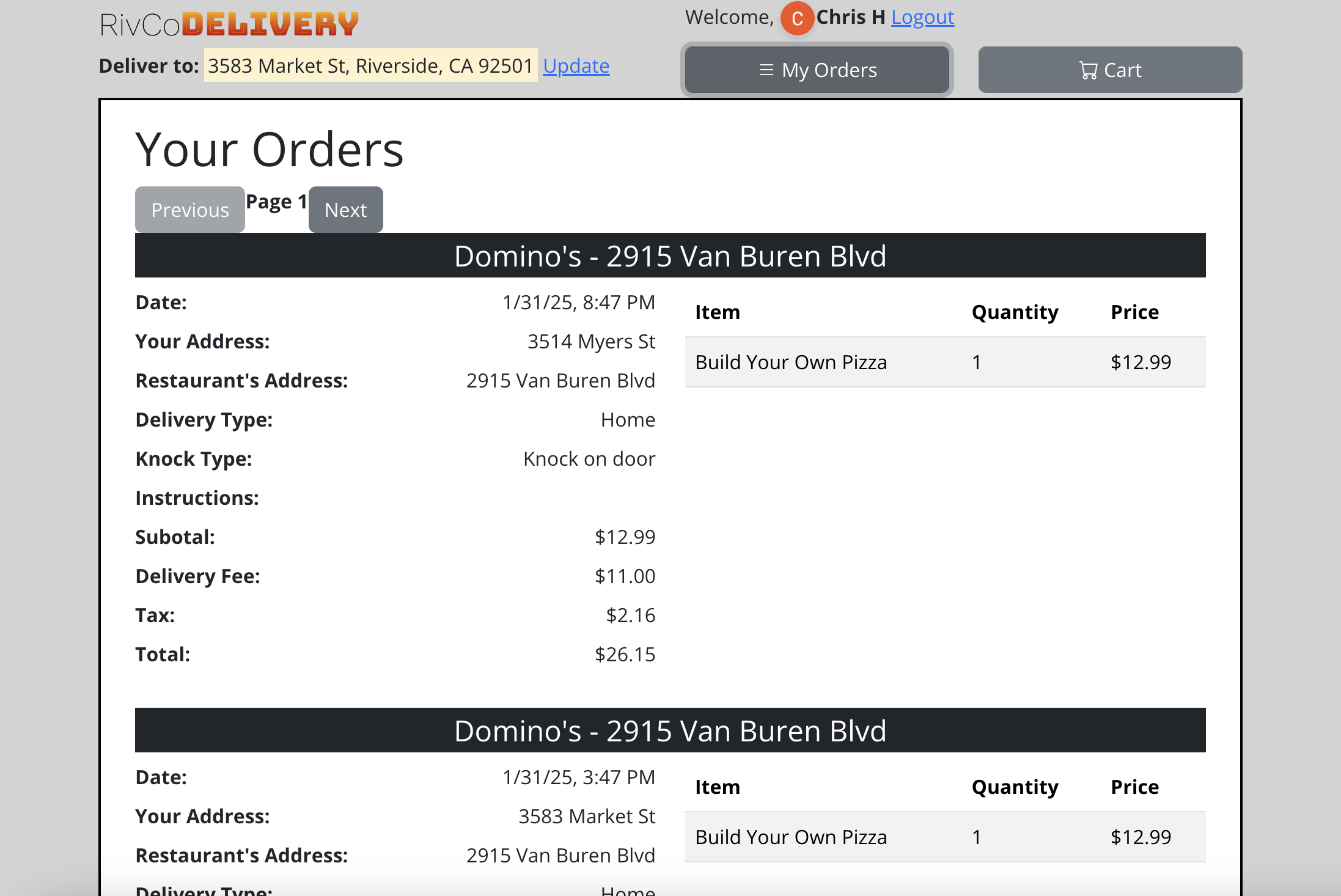
UserOrders Component
Location: src/components/users/orders/UserOrders.jsx
Features:
- Display user’s order history
- Server-side pagination (via reusable Pagination component)
- Order details with itemized breakdown
- Order items display
- Date formatting
- Handles direct navigation/refresh via SSR wrapper page
DriverOrders Component
Location: src/components/drivers/orders/DriverOrders.jsx
Features:
- Display open orders
- Order details (address, instructions, delivery type)
- Order items table
- Mark order as closed
- Server-side pagination (via reusable Pagination component)
- Handles direct navigation/refresh via SSR wrapper page
6.5 User Profile Management
DeliveryAddress Component
Location: src/components/users/address/DeliveryAddress.jsx
Features:
- Google Places Autocomplete
- Address input form
- Latitude/longitude capture
- Address validation
- Address display
PlaceAutocomplete Component
Location: src/components/users/address/PlaceAutocomplete.jsx
Features:
- Google Places API integration
- Address autocomplete dropdown
- Place selection
- Address parsing
6.7 Restaurant Administration
Admin Component
Location: src/components/restaurants/Admin.jsx
Features:
- Restaurant management section
- Menu update section
- Admin panel navigation
ManageRestaurant Component
Location: src/components/restaurants/ManageRestaurant.jsx
Features:
- Create/update restaurant profile
- Address input with geocoding
- Restaurant information form
- Save restaurant data
MenuUpdate Component
Location: src/components/restaurants/menu/MenuUpdate.jsx
Features:
- Menu item list
- Add new menu item
- Edit existing menu items
- Delete menu items
- Ingredient management
NewMenuItem Component
Location: src/components/restaurants/menu/menu_items/NewMenuItem.jsx
Features:
- Menu item creation form
- Size and price configuration
- Category selection
- Sort order setting
EditItem Component
Location: src/components/restaurants/menu/menu_items/EditItem.jsx
Features:
- Menu item editing form
- Update menu item details
- Ingredient linking interface
Ingredient Management Components
Location: src/components/restaurants/menu/menu_items/ingredients/
Components:
NewIngredient.jsx- Create new ingredientEditIngredient.jsx- Edit ingredientIngredient.jsx- Display ingredientMenuItemWithIngredients.jsx- Manage ingredient relationships
6.7 Webmaster/Admin Features
Users Component
Location: src/components/webmaster/Users.jsx
Features:
- User list with server-side pagination (via reusable Pagination component)
- User search and filtering
- Role assignment (slider: 0-2)
- Restaurant assignment with debounced API calls
- Clear user cart functionality (admin-only)
- User management interface
- Handles direct navigation/refresh via SSR wrapper page
6.9 SEO and SSR Features
SSR Page Structure
All public-facing pages are server-rendered using Astro for optimal SEO:
Key Features:
- Full HTML rendered on server with meta tags
- Structured data (JSON-LD) for restaurants, breadcrumbs, products
- Canonical URLs
- Open Graph and Twitter Card meta tags
- Breadcrumb navigation with structured data
- Semantic HTML structure
SSR Pages:
- Home page with city listings
- City pages with restaurant listings
- Restaurant menu pages
- Menu item detail pages
- Category pages
- Global and restaurant-specific ingredient pages
- Blog posts
Breadcrumb System
SSR Breadcrumbs:
- Component:
src/components/Breadcrumb.astro - Generates JSON-LD structured data
- Used in all SSR pages
- Consistent styling and structure
SPA Breadcrumbs:
- Component:
src/components/common/BreadcrumbWrapper.jsx - Dynamically generates from React Router location
- Matches SSR breadcrumb HTML structure exactly
- Generates JSON-LD structured data client-side
- Handles nested routes automatically
SEO Optimizations
Meta Tags:
- Keyword-rich titles with location and action words
- Compelling meta descriptions (150-160 characters)
- Consistent title format:
[Content] in [Location], CA | Order Online | RivCoDelivery
Structured Data:
- Restaurant schema (name, address, cuisine, geo coordinates)
- BreadcrumbList schema
- Product schema for menu items
- CollectionPage schema for category/ingredient pages
URL Structure:
- SEO-friendly slugs:
/restaurants/riverside-ca/1-domino-s - Hierarchical structure: city → restaurant → menu item
- Category and ingredient pages with descriptive URLs
Performance:
- Server-side rendering for fast initial load
- Optimized images and fonts
- Minimal JavaScript for SSR pages
- Progressive enhancement (SPA mounts only for authenticated users)
7. Functional Requirements
7.1 Authentication and Authorization
FR-1.1: System shall authenticate users via Google OAuth 2.0
Priority: High
Implementation: /api/google-login, /api/auth/google
FR-1.2: System shall maintain user sessions with 2-hour expiration
Priority: High
Implementation: Express-session with MySQL store
FR-1.3: System shall enforce role-based access control on all protected routes
Priority: High
Implementation: checkRole middleware
FR-1.4: System shall allow users to logout
Priority: Medium
Implementation: /api/logout
7.2 Restaurant Discovery
FR-2.1: System shall display restaurants sorted by distance from user location
Priority: High
Implementation: /api/restaurants/:latitude/:longitude, Haversine distance calculation
FR-2.2: System shall allow users to select a restaurant
Priority: High
Implementation: RestaurantsList component
FR-2.3: System shall display restaurant details (name, address, category)
Priority: Medium
Implementation: /api/restaurants/:restaurant
7.3 Menu Browsing and Customization
FR-3.1: System shall display restaurant menu items
Priority: High
Implementation: /api/restaurants2/:restaurantId/menu, Menu component
FR-3.2: System shall allow users to view menu item details
Priority: High
Implementation: /api/menu/item, MenuItem component
FR-3.3: System shall display available ingredients for menu items
Priority: High
Implementation: /api/menu/item/ingredients
FR-3.4: System shall allow users to customize menu items with ingredients
Priority: High
Implementation: MenuItem component with ingredient selection
FR-3.5: System shall support multiple sizes per menu item (up to 4)
Priority: Medium
Implementation: size1-4, price-price4 fields
FR-3.6: System shall calculate price with ingredient add-ons
Priority: High
Implementation: Price calculation in MenuItem and checkout
FR-3.7: System shall allow ingredient customization (Regular/Easy/Extra)
Priority: Medium
Implementation: Ingredient customize field
FR-3.8: System shall support half portions for halfable ingredients
Priority: Low
Implementation: halfer array, halfable flag
7.4 Shopping Cart Management
FR-4.1: System shall allow users to add items to cart
Priority: High
Implementation: POST /api/cart, MenuItem component
FR-4.2: System shall persist cart across sessions
Priority: High
Implementation: Cart stored in database, loaded on login
FR-4.3: System shall display cart items with quantities and prices
Priority: High
Implementation: GET /api/cart, Cart component
FR-4.4: System shall allow users to modify item quantities
Priority: Medium
Implementation: Cart component
FR-4.5: System shall allow users to remove items from cart
Priority: Medium
Implementation: Cart component, POST /api/cart (replace entire cart)
FR-4.6: System shall validate all cart items belong to same restaurant
Priority: High
Implementation: Cart validation in POST /api/cart
FR-4.7: System shall clear cart after successful order placement
Priority: High
Implementation: DELETE /api/cart after order creation
7.5 Order Placement
FR-5.1: System shall calculate delivery fee based on distance
Priority: High
Implementation: Haversine distance, BASE_DELIVERY_FEE + distance, min 1 mile
FR-5.2: System shall calculate tax (9% of subtotal + delivery fee)
Priority: High
Implementation: TAX_RATE constant, tax calculation in checkout
FR-5.3: System shall allow users to provide delivery instructions
Priority: Medium
Implementation: CheckoutForm, max 500 characters
FR-5.4: System shall allow users to select business type (Home/Apartment/Business)
Priority: Medium
Implementation: CheckoutForm business type selection
FR-5.5: System shall allow users to select knock type (Knock/Ring/Leave)
Priority: Medium
Implementation: CheckoutForm knock type selection
FR-5.6: System shall validate user has delivery address before checkout
Priority: High
Implementation: Address validation in checkout
FR-5.7: System shall create order record with all order details
Priority: High
Implementation: POST /api/co, order creation in checkout.js
FR-5.8: System shall create order items for each cart item
Priority: High
Implementation: order_items table insertion
FR-5.9: System shall apply rate limiting to order placement (1 per 30 seconds)
Priority: Medium
Implementation: orderLimiter middleware
7.6 Order Management
FR-6.1: System shall display user’s order history
Priority: High
Implementation: GET /api/user/orders, UserOrders component
FR-6.2: System shall display order details (items, prices, address)
Priority: High
Implementation: GET /api/order_items, order display components
FR-6.3: System shall allow drivers to view open orders
Priority: High
Implementation: GET /api/orders, DriverOrders component
FR-6.4: System shall allow drivers to mark orders as closed
Priority: High
Implementation: POST /api/changeOrderOpen
FR-6.5: System shall support pagination for order lists
Priority: Medium
Implementation: Pagination query parameters, pagination components
7.7 User Profile Management
FR-7.1: System shall allow users to view their profile
Priority: Medium
Implementation: GET /api/user/details
FR-7.2: System shall allow users to set delivery address
Priority: High
Implementation: POST /api/user/address, DeliveryAddress component
FR-7.3: System shall allow users to update delivery address
Priority: High
Implementation: POST /api/user/address
FR-7.4: System shall allow users to clear delivery address
Priority: Low
Implementation: PUT /api/user/address
FR-7.5: System shall use Google Places API for address autocomplete
Priority: Medium
Implementation: PlaceAutocomplete component
7.8 Restaurant Administration
FR-8.1: System shall allow restaurant owners to create restaurant profile
Priority: High
Implementation: POST /api/addRestaurant, ManageRestaurant component
FR-8.2: System shall allow restaurant owners to update restaurant profile
Priority: High
Implementation: POST /api/manageRestaurant
FR-8.3: System shall allow restaurant owners to view their restaurant
Priority: Medium
Implementation: GET /api/getUserRestaurant
FR-8.4: System shall restrict restaurant management to own restaurant only
Priority: High
Implementation: Restaurant ownership validation
7.9 Menu Administration
FR-9.1: System shall allow restaurant owners to create menu items
Priority: High
Implementation: POST /api/add-menu-item, NewMenuItem component
FR-9.2: System shall allow restaurant owners to update menu items
Priority: High
Implementation: POST /api/update-menu-item/:id, EditItem component
FR-9.3: System shall allow restaurant owners to delete menu items
Priority: High
Implementation: DELETE /api/menu-items/:id
FR-9.4: System shall allow restaurant owners to view their menu items
Priority: High
Implementation: GET /api/menu-items-list
FR-9.5: System shall allow restaurant owners to create ingredients
Priority: High
Implementation: POST /api/menu-item-ingredients, NewIngredient component
FR-9.6: System shall allow restaurant owners to update ingredients
Priority: High
Implementation: PUT /api/menu-ingredients/:id, EditIngredient component
FR-9.7: System shall allow restaurant owners to delete ingredients
Priority: High
Implementation: DELETE /api/menu-item-ingredients/:ingredient_id
FR-9.8: System shall allow restaurant owners to link ingredients to menu items
Priority: High
Implementation: POST /api/menu-items
FR-9.9: System shall restrict menu management to own restaurant only
Priority: High
Implementation: Restaurant ownership validation in all menu routes
7.10 User Management (Admin)
FR-10.1: System shall allow admins to view all users
Priority: Medium
Implementation: GET /api/users, Users component
FR-10.2: System shall allow admins to search users by name or email
Priority: Low
Implementation: Query parameter in GET /api/users
FR-10.3: System shall allow admins to change user roles
Priority: Medium
Implementation: PUT /api/users/:id/role
FR-10.4: System shall allow admins to assign restaurants to users
Priority: Medium
Implementation: PUT /api/users/:id/restaurant
FR-10.5: System shall prevent admins from changing their own role
Priority: High
Implementation: Self-role change prevention
FR-10.6: System shall prevent lowering admin role
Priority: High
Implementation: Admin role protection
8. Non-Functional Requirements
8.1 Security Requirements
NFR-1.1: System shall use HTTPS in production
Priority: High
NFR-1.2: System shall implement CSRF protection
Priority: High
Implementation: csurf middleware, XSRF-TOKEN cookie
NFR-1.3: System shall validate all user inputs
Priority: High
Implementation: Zod schemas for all inputs
NFR-1.4: System shall implement rate limiting on authentication endpoints
Priority: High
Implementation: 5 attempts per 15 minutes on login
NFR-1.5: System shall implement rate limiting on order placement
Priority: Medium
Implementation: 1 order per 30 seconds
NFR-1.6: System shall use prepared statements for all database queries
Priority: High
Implementation: mysql2 with parameterized queries
NFR-1.7: System shall enforce role-based access control
Priority: High
Implementation: checkRole middleware on all protected routes
NFR-1.8: System shall use secure session cookies (httpOnly, sameSite)
Priority: High
Implementation: Express-session configuration
NFR-1.9: System shall implement security headers via Helmet
Priority: High
Implementation: Helmet middleware with CSP
NFR-1.10: System shall restrict CORS to production domains
Priority: High
Implementation: CORS configuration
8.2 Performance Requirements
NFR-2.1: System shall respond to API requests within 2 seconds
Priority: Medium
NFR-2.2: System shall use database connection pooling
Priority: High
Implementation: mysql2 connection pool (limit: 10)
NFR-2.3: System shall limit pagination results (max 100 per page)
Priority: Medium
Implementation: Pagination limits in schemas
NFR-2.4: System shall limit cart item arrays (max 50 elements)
Priority: Medium
Implementation: Cart validation schemas
8.3 Scalability Requirements
NFR-3.1: System shall support concurrent user sessions
Priority: High
Implementation: MySQL session store, connection pooling
NFR-3.2: System shall support multiple restaurants
Priority: High
NFR-3.3: System shall support pagination for large datasets
Priority: Medium
Implementation: Pagination on orders and users
8.4 Usability Requirements
NFR-4.1: System shall provide clear error messages
Priority: Medium
Implementation: Error responses with descriptive messages
NFR-4.2: System shall provide loading indicators for async operations
Priority: Low
Implementation: Spinner component
NFR-4.3: System shall be responsive on mobile devices
Priority: Medium
Implementation: Bootstrap responsive classes
NFR-4.4: System shall provide address autocomplete
Priority: Medium
Implementation: Google Places Autocomplete
9. Data Models and Schemas
9.1 Database Tables
users
- id (VARCHAR(255), PRIMARY KEY) - Google user ID
- name (VARCHAR(255))
- email (VARCHAR(255))
- role (INT, DEFAULT 0) - 0: User, 1: Driver, 2: Restaurant/Admin
- restaurant_id (INT, NULL) - Associated restaurant (for owners)
- selected_restaurant (INT, NULL) - User's selected restaurant preference
- address_street_number (VARCHAR(50), NULL)
- address_street (VARCHAR(200), NULL)
- address_city (VARCHAR(100), NULL)
- address_state (VARCHAR(50), NULL)
- address_zip (VARCHAR(20), NULL)
- address_latitude (DECIMAL(10,8), NULL)
- address_longitude (DECIMAL(11,8), NULL)
- address (TEXT, NULL) - Legacy full address field
restaurants
- id (INT, AUTO_INCREMENT, PRIMARY KEY)
- name (VARCHAR(255))
- address (VARCHAR(255))
- latitude (DECIMAL(10,8))
- longitude (DECIMAL(11,8))
- category (VARCHAR(255), NULL)
menu_items
- id (INT, AUTO_INCREMENT, PRIMARY KEY)
- restaurant_id (INT, FOREIGN KEY -> restaurants.id)
- name (VARCHAR(255))
- price (DECIMAL(10,2))
- price2 (DECIMAL(10,2), NULL)
- price3 (DECIMAL(10,2), NULL)
- price4 (DECIMAL(10,2), NULL)
- size1 (VARCHAR(255), NULL)
- size2 (VARCHAR(255), NULL)
- size3 (VARCHAR(255), NULL)
- size4 (VARCHAR(255), NULL)
- category (VARCHAR(255))
- sort (INT, DEFAULT 2)
menu_item_ingredients
- id (INT, AUTO_INCREMENT, PRIMARY KEY)
- ingredients_name (VARCHAR(100))
- type (VARCHAR(50))
- price (DECIMAL(10,2), DEFAULT 0)
- extra_price (DECIMAL(10,2), NULL)
- easy_price (DECIMAL(10,2), NULL)
- customize (INT, DEFAULT 0) - 0: no, 1: yes
- halfable (INT, DEFAULT 0) - 0: no, 1: yes
- inputType (INT, DEFAULT 0)
- selected (INT, DEFAULT 0)
- sort_order (INT, DEFAULT 0)
menu_item_ingredients_map
- menu_item_id (INT, FOREIGN KEY -> menu_items.id)
- ingredient_id (INT, FOREIGN KEY -> menu_item_ingredients.id)
- PRIMARY KEY (menu_item_id, ingredient_id)
cart
- id (INT, AUTO_INCREMENT, PRIMARY KEY)
- name (VARCHAR(255))
- price (DECIMAL(10,2))
- quantity (INT)
- ingredients (TEXT) - JSON array
- halfer (TEXT) - JSON array
- arrs (TEXT) - JSON array
- user_id (VARCHAR(255), FOREIGN KEY -> users.id)
- size1 (VARCHAR(255), NULL)
- val1 (INT, DEFAULT 0)
- size2 (VARCHAR(255), NULL)
- val2 (INT, DEFAULT 0)
- size3 (VARCHAR(255), NULL)
- val3 (INT, DEFAULT 0)
- size4 (VARCHAR(255), NULL)
- val4 (INT, DEFAULT 0)
- restaurant_id (INT)
- created_at (TIMESTAMP, DEFAULT CURRENT_TIMESTAMP)
orders
- id (INT, AUTO_INCREMENT, PRIMARY KEY)
- user_id (VARCHAR(255), FOREIGN KEY -> users.id)
- address (TEXT)
- instructions (TEXT, NULL)
- business_type (VARCHAR(100), NULL)
- knock_type (VARCHAR(50), NULL)
- item_count (INT)
- restaurant (VARCHAR(255))
- restaurant_address (VARCHAR(255))
- delivery_fee (DECIMAL(10,2))
- subtotal (DECIMAL(10,2))
- distance (DECIMAL(5,1))
- tax (DECIMAL(10,2))
- total (DECIMAL(10,2))
- date (TIMESTAMP, DEFAULT CURRENT_TIMESTAMP)
- open (INT, DEFAULT 0) - 0: open, 1: closed
order_items
- id (INT, AUTO_INCREMENT, PRIMARY KEY)
- order_id (INT, FOREIGN KEY -> orders.id)
- name (VARCHAR(255))
- size (VARCHAR(255), NULL)
- price (DECIMAL(10,2))
- quantity (INT)
- ingredients (TEXT) - Formatted ingredient summary
sessions
- session_id (VARCHAR(128), PRIMARY KEY)
- expires (INT, UNSIGNED)
- data (TEXT)
9.2 Validation Schemas (Zod)
Key Schemas:
addRestaurantSchema- Restaurant creation/updateaddMenuItemSchema- Menu item creationupdateMenuItemSchema- Menu item updatecartItemInputSchema- Cart item validationuserAddressPostSchema- Address updateingredientBodySchema- Ingredient creation/updatepaginationQuerySchema- Pagination parameterscheckoutUserInputSchema- Checkout form datarestaurantIdParamSchema- Restaurant ID validationmenuItemIdParamSchema- Menu item ID validationuserIdParamSchema- User ID validation
Validation Rules:
- String length limits (50-500 chars depending on field)
- Number ranges (latitude: -90 to 90, longitude: -180 to 180)
- Array size limits (max 50 for cart arrays)
- Required field validation
- Type coercion and sanitization
- SQL injection prevention (LIKE pattern escaping)
10. Security Features
10.1 CSRF Protection
Implementation:
csurfmiddleware on all state-changing operations- XSRF-TOKEN cookie set on each request
- Frontend must include CSRF token in requests
Configuration:
app.use(csrf({
  cookie: {
    httpOnly: true,
    secure: false, // true in production with HTTPS
    sameSite: 'none'
  }
}));
10.2 Rate Limiting
Login Rate Limiting:
- 5 attempts per 15 minutes
- Applied to
/api/google-login
Order Rate Limiting:
- 1 order per 30 seconds
- Applied to
/api/co
Implementation:
express-rate-limitmiddleware- Window-based rate limiting
- Error response with retry information
10.3 Input Validation
Validation Strategy:
- Zod schemas for all user inputs
- Type coercion and sanitization
- Length limits on all string fields
- Range validation for numbers
- Array size limits
- SQL pattern injection prevention
Key Validations:
- Cart items: max 50 ingredients/halfer/arrs, quantity max 100
- Address fields: length limits (20-200 chars)
- Menu item names: max 255 chars
- Instructions: max 500 chars
- Latitude: -90 to 90
- Longitude: -180 to 180
10.4 Role-Based Access Control
Implementation:
checkRole(requiredRole)middleware factory- Role hierarchy: 0 (User) < 1 (Driver) < 2 (Admin)
- Database role lookup on each request
- 401 for unauthenticated, 403 for insufficient role
Access Control Matrix:
- Role 0: Basic user operations
- Role 1: Role 0 + Driver operations
- Role 2: Role 1 + Restaurant/Admin operations
Ownership Validation:
- Users can only modify own data
- Restaurant owners can only manage own restaurant
- Menu items/ingredients restricted to owner’s restaurant
10.5 Session Management
Configuration:
- Session stored in MySQL (
sessionstable) - 2-hour expiration (maxAge: 2 * 60 * 60 * 1000)
- httpOnly cookies (prevents XSS)
- sameSite: ‘lax’ (CSRF protection)
- Secure flag in production (HTTPS only)
Session Data:
req.session.user = {
  sub: "Google user ID",
  email: "[email protected]",
  name: "User Name",
  picture: "profile picture URL"
}
10.6 Security Headers
Helmet Configuration:
- Content Security Policy (CSP)
- HSTS (HTTP Strict Transport Security)
- Referrer Policy: no-referrer
- Cross-Origin Embedder Policy
- Cross-Origin Opener Policy
CSP Directives:
- defaultSrc: ‘self’
- scriptSrc: ‘self’, ‘unsafe-inline’, maps.googleapis.com
- styleSrc: ‘self’, ‘unsafe-inline’
- imgSrc: ‘self’, data:, https:
- connectSrc: ‘self’, maps.googleapis.com
10.7 SQL Injection Prevention
Strategies:
- Prepared statements for all queries
- Parameterized queries (mysql2)
- Input validation before database operations
- LIKE pattern escaping for search queries
- Type validation (Zod) before SQL execution
Example:
await pool.execute(
  'SELECT * FROM users WHERE id = ?',
  [userId] // Parameterized, safe
);
11. Helper Functions and Utilities
11.1 Distance Calculation
haversine_dist(lat, lng, lat2, lng2)
Location: RivCo_Server/utils/helpers.js
Purpose: Calculate distance between two coordinates using Haversine formula
Parameters:
lat(number) - Latitude of point 1lng(number) - Longitude of point 1lat2(number) - Latitude of point 2lng2(number) - Longitude of point 2
Returns: Distance in miles (number)
Formula: Haversine formula with Earth radius = 3958.8 miles
Usage:
- Restaurant distance calculation
- Delivery fee calculation
11.2 Price Calculations
toCents(value)
Location: RivCo_Server/utils/helpers.js
Purpose: Convert dollar amount to cents (integer)
Parameters:
value(number|string|null|undefined) - Dollar amount
Returns: Cents as integer (0 if invalid)
Usage: Price calculations to avoid floating-point errors
centsToFixed(cents, decimals = 2)
Location: RivCo_Server/utils/helpers.js
Purpose: Convert cents to fixed decimal string
Parameters:
cents(number) - Amount in centsdecimals(number, default: 2) - Decimal places
Returns: Formatted string (e.g., “10.99”)
Usage: Display prices, store in database
11.3 Address Formatting
buildUserAddress(userRow)
Location: RivCo_Server/utils/helpers.js
Purpose: Build formatted address string from user row
Parameters:
userRow(object) - User database row with address fields
Returns: Formatted address string
Format: “Street Number Street, City, State ZIP”
Usage:
- Order address formatting
- Address display
11.4 JSON Parsing Utilities
safeJsonParse(payload, fallback)
Location: RivCo_Server/utils/helpers.js
Purpose: Safely parse JSON with fallback
Parameters:
payload(any) - Value to parsefallback(any) - Fallback value if parsing fails
Returns: Parsed value or fallback
Usage:
- Cart item parsing (ingredients, halfer, arrs)
- Order item parsing
11.5 Ingredient Utilities
isSelectedIngredient(entry)
Location: RivCo_Server/utils/helpers.js
Purpose: Check if ingredient is selected
Parameters:
entry(any) - Ingredient selection entry
Returns: Boolean
Logic: Handles various formats (boolean, array, string “1”/“true”)
formatIngredientSummary(ingredientsRows, selections, halfSelections)
Location: RivCo_Server/utils/helpers.js
Purpose: Format ingredient summary string for order items
Parameters:
ingredientsRows(array) - Ingredient definitions from databaseselections(array) - User’s ingredient selectionshalfSelections(array) - User’s half portion selections
Returns: Formatted string (e.g., “[Cheese (Regular)] [Pepperoni (Extra; Half)]“)
Usage:
- Order item ingredient display
- Order summary generation
11.6 Constants
Location: RivCo_Server/utils/helpers.js
TAX_RATE = 0.09- Tax rate (9%)BASE_DELIVERY_FEE = 10- Base delivery fee in dollarsMIN_BILLABLE_DISTANCE_MILES = 1- Minimum distance for delivery fee calculation
11.7 Frontend Utilities
roundedToFixed(input, digits)
Location: cosmic-crater/src/components/App.jsx
Purpose: Round number to fixed decimal places
Parameters:
input(number) - Number to rounddigits(number) - Decimal places
Returns: Formatted string
Usage: Price display, distance formatting
dbPost2(e, inputs, route)
Location: cosmic-crater/src/components/App.jsx
Purpose: POST request helper with form encoding
Parameters:
e(event) - Event object (can be null)inputs(object) - Request body dataroute(string) - API route (without /api prefix)
Usage: Form submissions, API calls
dbGet(e, inputs, route)
Location: cosmic-crater/src/components/App.jsx
Purpose: GET request helper
Parameters: Same as dbPost2
Usage: API GET requests
Appendix A: API Endpoint Summary
Authentication (5 endpoints)
- POST
/api/google-login - GET
/api/session - GET
/api/logout - GET
/api/auth/google - GET
/api/auth/google/callback
User Management (7 endpoints)
- GET
/api/users - PUT
/api/users/:id/role - PUT
/api/users/:id/restaurant - PUT
/api/users/:id/selected_restaurant - GET
/api/users/:id/selected_restaurant - GET
/api/user/details - GET
/api/profile
User Address (4 endpoints)
- GET
/api/user/address - POST
/api/user/address - PUT
/api/user/address - GET
/api/user/full-address
Restaurants (5 endpoints)
- GET
/api/restaurants/:latitude/:longitude - GET
/api/restaurants/:restaurant - GET
/api/restaurants2/:restaurantId/menu - POST
/api/addRestaurant - POST
/api/manageRestaurant - GET
/api/getUserRestaurant
Menu Items (8 endpoints)
- GET
/api/menu/item - GET
/api/menu/item/search - GET
/api/menu/item/ingredients - POST
/api/add-menu-item - POST
/api/update-menu-item/:id - DELETE
/api/menu-items/:id - POST
/api/menu-items - GET
/api/menu-items-list
Menu Ingredients (3 endpoints)
- POST
/api/menu-item-ingredients - PUT
/api/menu-ingredients/:id - DELETE
/api/menu-item-ingredients/:ingredient_id
Cart (3 endpoints)
- GET
/api/cart - POST
/api/cart - DELETE
/api/cart
Checkout (2 endpoints)
- GET
/api/checkout-data/:selected_restaurant? - POST
/api/co
Orders (4 endpoints)
- GET
/api/orders - GET
/api/user/orders - GET
/api/order_items - POST
/api/changeOrderOpen
Public (1 endpoint)
- GET
/api/health
Total: 42 API endpoints
Appendix B: Component Summary
Core Application Components (2)
- App.jsx - Main SPA router with React Router setup, global state management, authentication handling
- SSRAppWrapper.jsx - Wrapper component that mounts SPA for authenticated users on SSR pages
Navigation & Layout Components (6)
- Navbar.jsx - Main navigation bar with authentication, cart badge, address management
- BottomNavbar.jsx - Bottom navigation bar with role-based menu items
- SSRNavbar.jsx - SSR-specific navbar component
- BreadcrumbWrapper.jsx - Dynamic breadcrumb generator for SPA routes (in
common/) - Logo.jsx - Application logo component
- RedirectToNewUrl.jsx - Handles backward compatibility redirects for legacy routes
User-Facing Components (14)
- RestaurantsList.jsx - Displays list of restaurants with filtering
- CategoryPage.jsx - Displays restaurants by category
- Menu.jsx - Restaurant menu display
- MenuItem.jsx - Individual menu item display and customization
- Cart.jsx - Shopping cart management
- CheckoutForm.jsx - Order checkout form
- OrderReview.jsx - Order review before submission
- Success.jsx - Order success confirmation page
- Failure.jsx - Order failure/error page
- UserOrders.jsx - User order history with pagination
- DeliveryAddress.jsx - Delivery address management
- PlaceAutocomplete.jsx - Google Places autocomplete for addresses
- TaxiFareCalculator.jsx - Taxi fare calculation tool
- Welcome.jsx - Welcome screen for new users
Restaurant Admin Components (10)
- Admin.jsx - Main admin dashboard
- ManageRestaurant.jsx - Restaurant profile management
- MenuUpdate.jsx - Menu item list and management interface
- NewMenuItem.jsx - Create new menu item form
- EditItem.jsx - Edit existing menu item form
- MenuItemWithIngredients.jsx - Menu item display with ingredient management
- NewIngredient.jsx - Create new ingredient form
- EditIngredient.jsx - Edit ingredient form
- Ingredient.jsx - Ingredient display component
- AdminDropdown.jsx - Admin action dropdown menu
Driver Components (1)
- DriverOrders.jsx - Driver order management with pagination
Webmaster/Admin Components (2)
- Users.jsx - User management interface with pagination and role assignment
- Resume.jsx - Resume/portfolio display component
Reusable UI Components (6)
- Button.jsx (in
common/) - Standardized button component with variants - Pagination.jsx (in
common/) - Reusable pagination component - ResponsiveFlexRow.jsx (in
common/) - Responsive flex layout with gradient variants - Spinner.jsx - Loading spinner component
- QuantitySelector.jsx - Quantity selection component
- Badge.jsx - Badge component for tags/labels
SSR-Specific Components (2)
- SSRGoogleSignIn.jsx - Google sign-in button for SSR pages
- CityFilter.jsx - City filtering component
Utility Components (2)
- OrderButtonWithAuth.jsx - Order button with authentication check
- Donate.jsx - Donation component
Total: 45 React components (excluding Astro components like Link.astro, BaseHead.astro, Header.astro, Footer.astro, Breadcrumb.astro)
Document Revision History
| Version | Date | Author | Changes |
|---|---|---|---|
| 1.0 | 2024 | System | Initial SRS document creation |
End of Document